1


Best overall
YAOHUOODual Monitor Stand Riser, 39Inch Large Monitor Stands for 2…
$33.99
Home/ Living/ monitor stand risers
Published 10/21/2026
Single risers in bamboo and wood share this list with dual-monitor stands up to 39 inches wide and a few that add drawers. Raising a screen a few inches brings its top edge closer to eye level, where most people find it easiest to look.
YAOHUOODual Monitor Stand Riser, 39Inch Large Monitor Stands for 2…


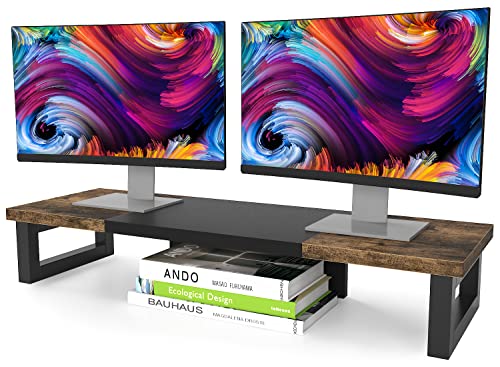


WESTREEDual Monitor Stand Riser, Wood and Steel Multi-Purpose Desktop…


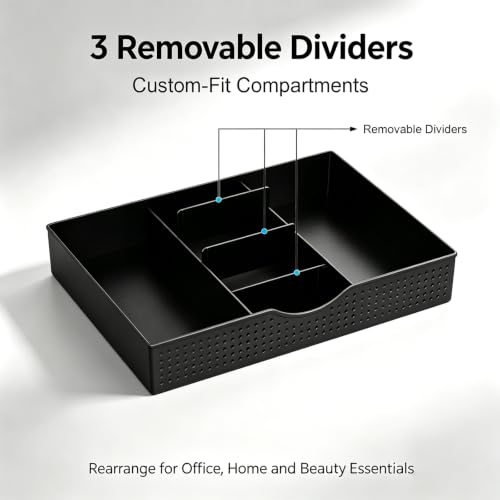

gianotterDual Monitor Stand Riser With Drawer and 2 Pen Holders
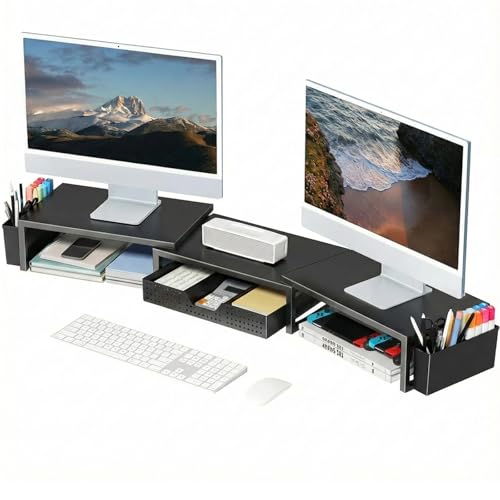


OPNICEDesk Organizers and Accessories, Dual Monitor Stand Riser with…


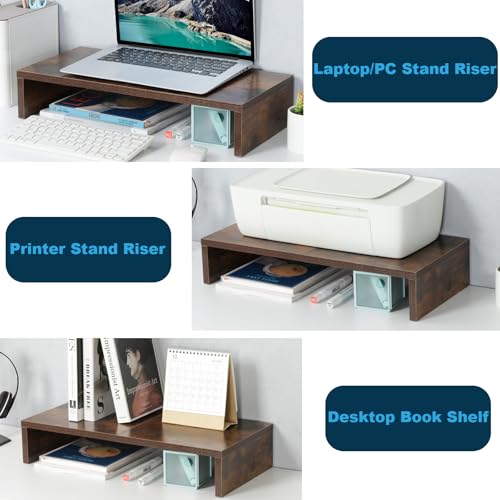

TEAMIX20 inch Wood Monitor Stand Riser, Desktop Riser Shelf, Rustic Brown


OPNICEDesk Organizer and Accessories, 2-Tier Computer Monitor Stand…




gianotterDesk Organizers and Accessories, Monitor Stand with Drawer and 2…


BONTEC2 Pack Adjustable Monitor Stand Riser with Drawer, Supports 44lbs


CanyoraComputer Monitor Stand Riser For Desk, 3 Height Adjustable, 2 Pack


HUANUOMonitor Riser for Desk, Laptop Stand with Vented Steel Shelf, Black




ECOLOVIAdjustable Wood Computer Monitor Stand Riser, Office Desk…


WALIComputer Monitor Stand for Desk, Adjustable Laptop Riser, up to 44 lbs
| Pick | |||||||||||||
|---|---|---|---|---|---|---|---|---|---|---|---|---|---|
| Best for | Dual-monitor setups on wide desks | Home offices that want a finished look | Rustic desks with two screens | Cluttered desks with lots of small supplies | Modern desks that need steady storage | One monitor on a small desk | Laptop users with one external monitor | Dorm desks and home offices | Mixing a monitor and a laptop | Laptops and small PCs that run warm | Simple single-screen lift | Budget desks that want wood | A cheap quick fix for neck strain |
| Dimensions | 39 in | 23.6 x 7.9 x 4.5 in | 35.8 x 10.2 x 4.9 in | 40.6 x 9.3 x 4.3 in | 10 x 3.6 x 16.1 in | 20 in | 14 x 9.1 x 5.6 in | 17.7 x 9.6 x 5.3 in | 14.5 x 9.1 x 5.5 in | 14.6 in | 14.6 x 9.2 x 3.9 in | 14.6 x 9.1 x 4 in | 14.6 x 9.3 in shelf |
| Assembly | Required, about 10 minutes per the product page | Required | Required | None, ships assembled | Required | Required | Required | Required, about 3 minutes per the product page | Required, no tools needed | Required, no tools needed | Required | Required | Required |
|
HS score
Methodology: The House Staples Score is our editorial rating, out of 5, of how well a product suits this guide, weighing its build, materials, size, and value against the others we compared. It is separate from customer star ratings. | 4.6 | 4.5 | 4.5 | 4.4 | 4.4 | 4.3 | 4.3 | 4.2 | 4.2 | 4.1 | 4.1 | 4.0 | 4.0 |
| Notes | Center the riser on the desk so both screens sit at the same angle. · Check that your monitor bases fit within the 10.2-inch depth. | Keep cables behind the drawer so it slides freely. · Wipe bamboo dry if a drink spills on it. | Measure your monitor stands to confirm both fit on the top. · Leave a gap at the back for cables to drop down. | Place the pen holders on your writing-hand side. · Keep the drawer for light items so it slides smoothly. | Add felt pads underneath if the metal feet scratch your desk. · Use the drawer for flat items like notebooks and cables. | Measure your keyboard height against the 2.95-inch gap. · Keep a coaster nearby to protect the MDF top. | Put the laptop on the lower tier and the monitor on top. · Keep heavier items over the center of each tier. | Leave the bottom tier clear if you want room for a keyboard. · Tighten the frame screws after a week of use. | Set both risers to the same height for matched screens. · Use the built-in pen holder for a stylus or pens. | Use the highest setting if you are tall. · Add rubber pads under the feet on a wood desk. | Pair it with a book if you need extra height. · Store papers underneath to keep the desk clear. | Pick a setting that puts the top of the screen at eye level. · Keep the riser centered under the monitor's base. | Keep a heavy monitor centered on the shelf to avoid flexing. · Use it at the lowest height for a heavy screen. |
| $ / size | $33.99 · 39 in | $49.99 · 23.6 x 7.9 x 4.5 in | $29.99 · 35.8 x 10.2 x 4.9 in | $26.99 · 40.6 x 9.3 x 4.3 in | $26.99 · 10 x 3.6 x 16.1 in | $20.99 · 20 in | $17.99 · 14 x 9.1 x 5.6 in | $21.99 · 17.7 x 9.6 x 5.3 in | $19.99 · 14.5 x 9.1 x 5.5 in | $17.98 · 14.6 in | $16.99 · 14.6 x 9.2 x 3.9 in | $13.99 · 14.6 x 9.1 x 4 in | $9.99 · 14.6 x 9.3 in shelf |
| Shop | Buy on AmazonRead review | Buy on AmazonRead review | Buy on AmazonRead review | Buy on AmazonRead review | Buy on AmazonRead review | Buy on AmazonRead review | Buy on AmazonRead review | Buy on AmazonRead review | Buy on AmazonRead review | Buy on AmazonRead review | Buy on AmazonRead review | Buy on AmazonRead review | Buy on AmazonRead review |
$33.99
At 38.6 by 10.2 inches, this platform is long enough for two monitors side by side, and it lifts them 5 inches off the desk. Heavy steel feet carry up to 100 pounds. The open space underneath fits a full keyboard when you push it away. It is the riser to buy for a dual-screen setup on a wide desk.
Specs come from the product page.
$49.99
Every part of this riser is FSC-certified bamboo with a water-based varnish. The top holds monitors from 24 to 32 inches, plus curved screens, up to 100 pounds. Below it, a second tier and a drawer hold a tablet, notebooks, and small gadgets. It costs the most of the single risers, and it looks like a piece of furniture on the desk.
Specs come from the product page.
$29.99
This dual-monitor stand uses a wood-look top on thick steel legs with anti-slip pads underneath. It lifts two screens to a more comfortable eye level and leaves room for a keyboard, papers, or a printer below. The rustic brown finish suits a farmhouse or industrial desk. It costs less than the YAOHUOO while covering a similar width.
Specs come from the product page.
$26.99
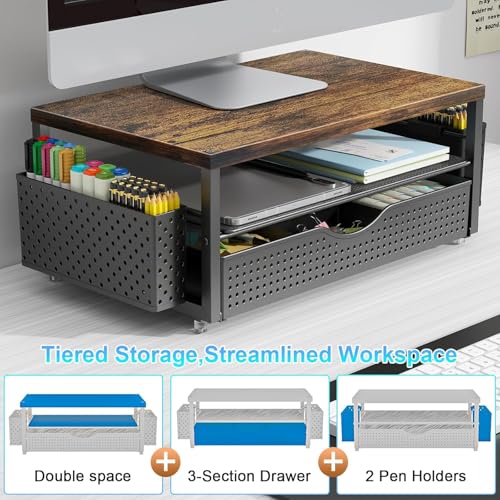
You unbox this riser and set it on the desk, with nothing to screw together. Two magnetic pen holders clip to the sides and a drawer sits under the top for clips and sticky notes. The platform raises one or two screens toward eye level. It suits a desk that collects small supplies.
Specs come from the product page.
$26.99
This riser is made of metal throughout, with a drawer and two hanging pen holders for office supplies. The top lifts a monitor or laptop to eye level, and the space beneath holds a keyboard, mouse, or files. It holds steadier than the wood-and-plastic organizer stands. The metal finish looks clean on a modern desk.
Specs come from the product page.
$20.99
This MDF top measures 20 by 9.5 inches and stands 4 inches high, with 2.95 inches of clear space underneath. A thick steel pipe across the back stops the platform from shaking, and the stand is rated for 80 pounds. It fits a single monitor, laptop, or small printer. The rustic brown top looks warmer than black metal risers.
Specs come from the product page.
$17.99
Two tiers let you stack a laptop under a monitor or keep files on the lower level. A drawer and two hanging pen holders handle small supplies. It is metal and sturdy enough for daily use. It costs less than the full-width OPNICE dual stand and fits a narrower desk.
Specs come from the product page.
$21.99
This stand pairs a wood top with rust-proof steel and adds two tiers of storage for files and notes. A drawer and two pen holders keep small supplies organized. It works in an office or a dorm room. The industrial look suits a desk with other wood and black metal pieces.
Specs come from the product page.
$19.99
This two-pack gives you a riser for each screen, or one for a monitor and one for a laptop. Each powder-coated steel platform adjusts to 3.9, 4.7, or 5.5 inches and holds 44 pounds. The mesh top vents heat from laptops. Rubber feet keep them from sliding.
Specs come from the product page.
$17.98
Each riser adjusts to 4.13, 4.92, or 5.7 inches and holds up to 44 pounds on a 14.6-by-9.3-inch metal shelf. The shelf is punched with 150 holes that let heat escape from laptops and small PCs. It also works on the floor under a printer or console. A pair costs under twenty dollars.
Specs come from the product page.
$16.99
This powder-coated steel riser measures 14.57 by 9.25 inches and stands 3.94 inches tall. Perforated holes help laptops and printers stay cool. It holds up to 44 pounds, which covers most flat monitors and small printers. The fixed height is simple and stable.
Specs come from the product page.
$13.99
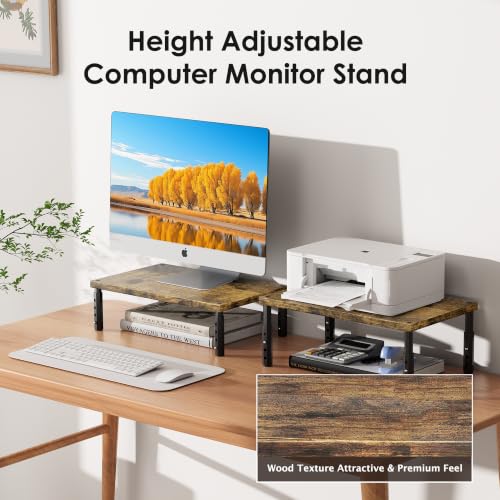
A warm wooden top sits on adjustable legs with four settings: 4.00, 4.80, 5.50, and 6.10 inches. Underneath, a 12.5-by-7-inch space holds a keyboard or notebooks. It supports up to 44 pounds. It is the cheapest riser here with a wood top.
Specs come from the product page.
$9.99
This black plastic riser has a 14.6-by-9.3-inch shelf with vented holes and three heights: 4.5, 5.3, and 6.1 inches. It holds up to 44 pounds. It is the least expensive way to lift a monitor or laptop. The plastic build is light and easy to move.
Specs come from the product page.
A monitor riser lifts the screen closer to eye level and frees space underneath for a keyboard or papers. Some hold one screen and some hold two, a few adjust in height, and several hide a drawer underneath.
The long dual-monitor risers are first for multi-screen desks. Small single risers suit laptops and compact monitors.
The top of the screen should sit near eye level when you sit upright. A short riser still leaves a tall user looking down.
Check the platform width and the weight rating against the monitor base. A narrow shelf will not take a wide foot.
A riser is simpler and adds storage, while an arm offers more adjustment and clears the desk. A riser suits most home desks without drilling or clamping.
This is general home-furnishing guidance, not structural or safety advice. Confirm weight limits, tip-over anchors, and local building rules where they apply.
Affiliate disclosure: we may earn a commission from Buy on Amazon links. Prices and availability change.